
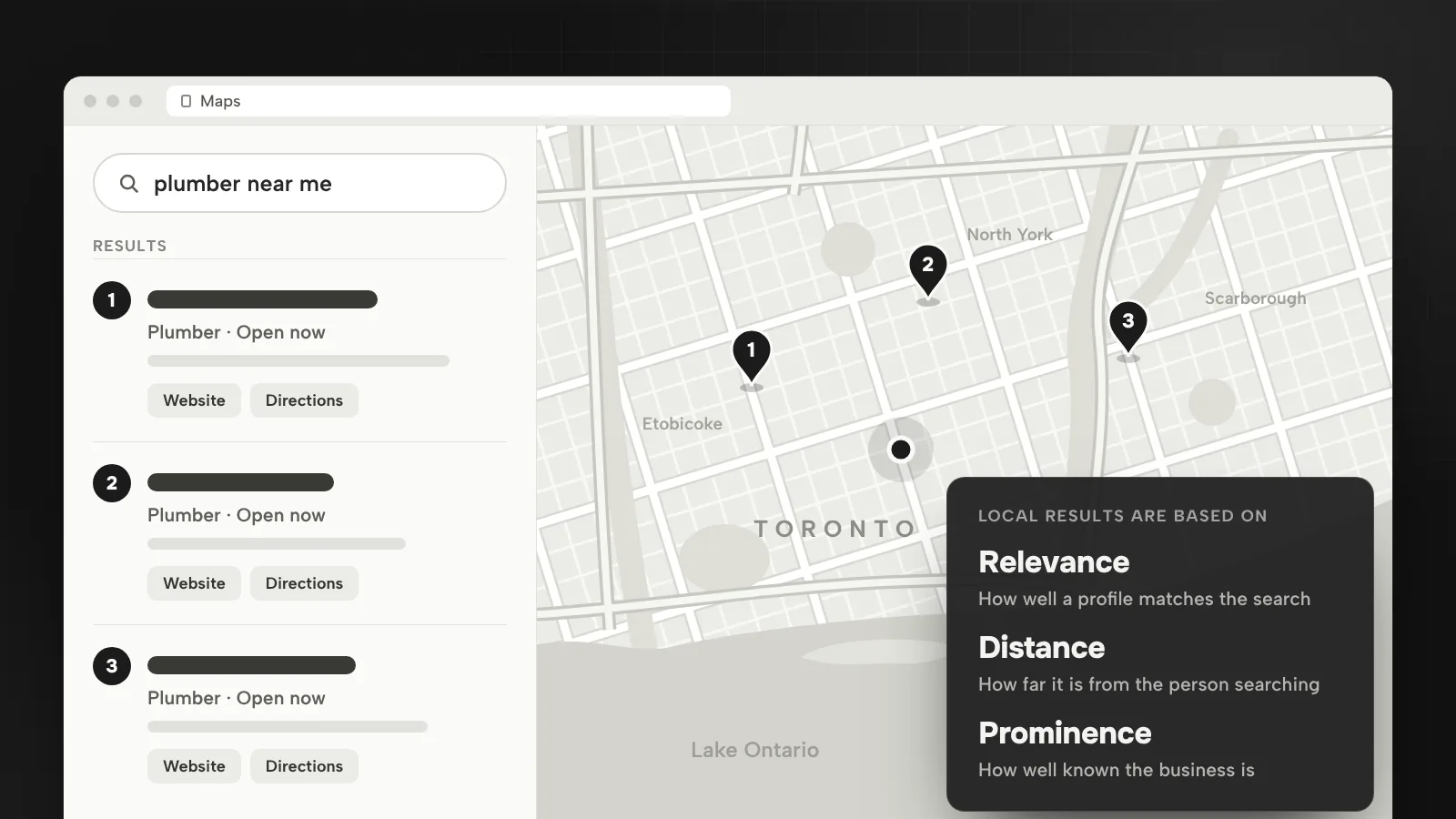
When someone in Toronto searches for a plumber, a painter or a clinic, Google often answers with a map and a short list of businesses before the regular results. For a local business, that list is where many calls start. This is how Google decides who appears in it, and the work I do to get a GTA business there.
How Google picks the businesses in the map
Google’s Business Profile help names three things its local results are mainly based on:
- Relevance: how well a Business Profile matches what someone is searching for.
- Distance: how far each business is from the person searching.
- Prominence: how well known a business is. Google says this is also based on information such as how many websites link to your business and how many reviews you have.
It also says there is no way to request or pay for a better local ranking. Ads can sit around the map, but the listings in it are earned. Everything below works on one of these three factors.
Why distance matters so much in Toronto
Distance is the factor you control least. Because Google measures how far each business is from the person searching, a roofer based in Etobicoke starts with an advantage for searches made in Etobicoke and a disadvantage for the same search made in Scarborough. In a city this size, with Peel, York, Durham and Halton around it, no single profile wins everywhere.
That changes the plan. Instead of chasing “Toronto” as one market, decide which areas you really serve and win them one at a time: the profile where you are based, and pages on your website for the areas you travel to.
If customers don’t come to you, Google asks service-area businesses to remove the address from the profile and set service areas instead. You can add up to 20, by city, postal code or area, and Google says the whole area shouldn’t be more than about two hours of driving from where the business is based. A hybrid business, such as a showroom that also installs on site, can show its address and a service area. P.O. boxes, remote mailboxes and rented addresses you don’t operate from aren’t eligible.
Get the Business Profile right first
Relevance starts with the profile. Google says businesses with complete and accurate information are more likely to show up in local search results, and that a verified profile is more likely to appear. The fields that matter most:
- Name. Your real-world business name, as it appears on your sign, website and stationery. Google’s guidelines don’t allow extras such as taglines or location information, so “Best Plumber Toronto” in the name field is a policy problem, not a tactic.
- Categories. Google says the categories you choose affect your local ranking. Pick the most specific primary category that describes the business, then only a few more. Google’s guidelines frame a category as what the business is, not everything it offers.
- Phone and website. Use a local number under your direct control rather than a central call centre helpline, and link to your own website, not a page that redirects somewhere else.
- Hours, services and photos. Keep hours accurate, including holidays, list your services and add real photos. Google’s photo tips suggest the outside of the building from each direction customers approach, the inside as a customer sees it and your team at work.
Give every service and area its own page
Your website supports relevance and prominence too. A page about drain cleaning in Vaughan answers that search far better than a home page that lists twenty services. The structure I use for local service businesses:
- One page per service, written around the problem the customer has, with photos of your own work, what affects the price and a clear way to call or book.
- One page per area you really serve, with what is different there: the neighbourhoods, the kind of homes or buildings, the questions people in that area ask.
- The same name, address and phone number on the site as on the profile, plus LocalBusiness structured data. Google says this markup can tell it about your business hours and departments, and that search results may show a knowledge panel with business details.
Be careful with city pages. Google’s spam policies describe doorway abuse as pages created to rank for specific, similar searches, including pages generated to funnel visitors into another part of a site. Twenty pages that differ only by the city name fit that description. An area page earns its place when it says something true only for that area.
This is how I built the Demir Mechanical website for a plumbing contractor in Thornhill: eight service pages and 18 GTA city pages, from Toronto, Scarborough and Etobicoke to Vaughan, Markham, Mississauga, Oakville and Ajax. Each city page has its own introduction, the neighbourhoods it covers and local questions, with links to every service and to nearby areas, and a call button on every screen. The Lumen Painting website follows the same idea across 48 pages: a page for each service and each GTA area it serves, a gallery of before and after photos, and every page leading to the free estimate form.
Reviews: ask every customer, the right way
Google says more reviews and positive ratings can help your local ranking, and that replying to reviews shows customers you value their feedback. The simplest way to get more is to ask every customer when the job is done. Your Business Profile can create a review link or QR code, and Google suggests putting it on receipts, in thank-you emails and at the end of a chat.
The rules are strict, and they apply to the business, not only to the reviewer. Google’s content policy for Maps bans:
- Offering anything in exchange for a review, or for changing or removing a negative one.
- Asking only satisfied customers, or discouraging negative reviews.
- Requiring or pressuring customers to leave a review while they are on your premises, or giving staff a number of reviews to collect.
- Reviews from people with a conflict of interest, such as current or former employees.
So no discount for a five-star review, and no survey that sends only the happy customers to Google. Ask everyone, reply to everyone and fix what the bad reviews point to.
Prominence: links and mentions from the GTA
Prominence is how well known you are, online and off, and Google names links to your business as part of it. The local links worth having come from real relationships:
- Suppliers, manufacturers and trade associations that list their installers or members.
- Local news, community groups and events you sponsor or take part in.
- Your neighbourhood business improvement area and the local chamber of commerce.
- Partners you already work with, such as a designer who recommends your painters.
Skip paid link packages. Google’s spam policies treat links created mainly to manipulate rankings, including buying or selling links for ranking purposes, as link spam.
What I would do first
- Fix the profile: real name, the most specific primary category, your address or service areas, a local phone number, hours and services.
- Map your areas: list the parts of the GTA where you want work and where you can realistically get it from where you are based.
- Build or fix the pages: one per service, then one per area with real local content.
- Ask for reviews after every job with your review link, and reply to each one.
- Earn three local links this quarter from partners, associations or local press.
Local SEO is part of my SEO and AI search service. For the wider plan, read the SEO strategy I recommend for 2026, and for what quietly holds local sites back, the most common SEO mistakes.
Questions
Can I show up in Google Maps without a storefront?
Yes. Google asks service-area businesses to remove their address from the profile and set up to 20 service areas instead, with the whole area within about two hours of driving from where the business is based. A virtual office or a mailbox you don’t work from isn’t eligible.
Should I put “Toronto” or my services in my Business Profile name?
No. Google’s guidelines say the name should reflect your real-world business name and must not include extras such as taglines or location information. Put the city and your services in your service areas, categories, services and website instead.
Do I need a separate page for every city I serve?
Only for the areas you really serve and can say something specific about. Google’s spam policies treat pages made to rank for specific, similar searches as doorway abuse, so each area page needs content that is true only for that area, such as the neighbourhoods, the jobs you do there and local questions.
Can I pay Google to rank higher in the map results?
No. Google says there is no way to request or pay for a better local ranking. Google Ads can show your business beside or above the results on Google Maps, but the regular listings depend on relevance, distance and how well known the business is.
Sources
- How to improve your local ranking on GoogleGoogle Business Profile Help, accessed October 2026
- Guidelines for representing your business on GoogleGoogle Business Profile Help, accessed October 2026
- Manage your service areas for service-area & hybrid businessesGoogle Business Profile Help, accessed October 2026
- Manage your business categoryGoogle Business Profile Help, accessed October 2026
- Tips for business-specific photos on your Business ProfileGoogle Business Profile Help, accessed October 2026
- Create a Google link or QR code to request reviewsGoogle Business Profile Help, accessed October 2026
- Prohibited & restricted content (fake engagement and rating manipulation)Google Maps user contributed content policy, accessed October 2026
- Spam policies for Google web search (doorway abuse, link spam)Google Search Central, August 28, 2026
- Local Business (LocalBusiness) structured dataGoogle Search Central, September 8, 2026
- About location assetsGoogle Ads Help, accessed October 2026

Bugrahan Unsal is a B2B and B2C marketing director in Toronto. He leads marketing for Glass Railing Store and RF Transparent and builds AI tools and websites. More about Bugrahan.
Follow on LinkedIn (opens in a new tab)